
You can use your Medicare Advantage OTC (Over-the-Counter) benefit card at most major retailers, including Walmart, CVS, Walgreens, Rite Aid, Dollar General, and many grocery store pharmacies. The card works like a debit card: you bring it to checkout, swipe it, and the cost of eligible items is automatically deducted from your balance. Ineligible items will simply not be charged to the card, so you pay for those out of pocket. Here is everything you need to know to shop confidently in-store and online.
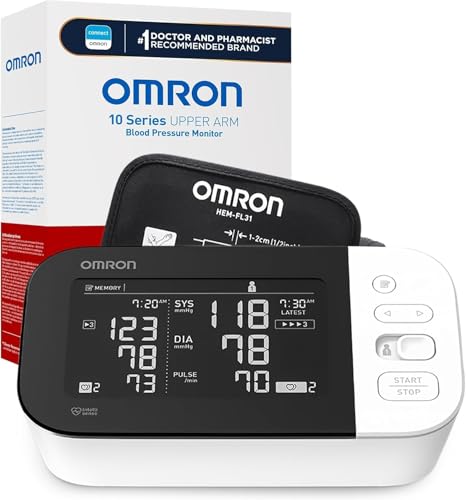
Omron Blood Pressure Monitor
$50-80 · Often covered by OTC benefit
Which Stores Accept the OTC Benefit Card?
Most Medicare Advantage OTC benefit cards are accepted at a wide network of retailers. The exact list depends on your plan, but common approved stores include:
- Walmart and Walmart Pharmacy
- CVS Pharmacy
- Walgreens
- Rite Aid
- Dollar General
- Kroger, Safeway, and other grocery store pharmacies (varies by region)
To confirm which stores are in your plan's network, log into your member portal or call Member Services. The number is on the back of your card.
How to Use the Card In-Store: Step by Step
Using your OTC card at a retail store is straightforward once you know the process. Follow these steps:
- Check your balance first. Before you shop, look up your remaining balance through your plan's app, website, or by calling Member Services. This prevents surprises at checkout.
- Shop in the health section. Focus on the pharmacy and health aisles where eligible items like vitamins, pain relievers, first aid supplies, and health monitors are stocked.
- Bring your items to the register. You do not need to separate eligible and ineligible items ahead of time; the system does this automatically.
- Swipe or insert your OTC card. At checkout, use the card just like a debit card. Select "credit" or "debit" depending on how your card is set up.
- The register will apply eligible amounts. Eligible items will be charged to your OTC balance. Any items that are not covered will show as a remaining balance you need to pay separately.
- Save your receipt. Your receipt will show which items were covered and what your remaining balance is.
Why Some Items Get Declined at the Register
A common frustration is putting items in your cart only to find the card declines them at checkout. This happens because not every health product in a store is on your plan's approved list. The card is programmed to recognize only items that match your plan's OTC catalog by their product barcode.
For example, a brand-name pain reliever might be covered, but a similar store-brand product might not appear in your plan's system. Or a vitamin might be on your plan's list in one size but not another. If an item is declined, pay for it another way and then check your plan's catalog to see why it was not covered.
Tips for Smarter In-Store Shopping
A few habits will make your in-store shopping trips go more smoothly:
- Download your plan's app. Many plans have a mobile app that lets you scan barcodes in-store to check whether a specific product is covered before you put it in your cart.
- Check your balance before every trip. If your quarterly balance is running low, it helps to know in advance so you can prioritize the most useful items.
- Ask the pharmacy staff. Pharmacists at CVS, Walgreens, and Walmart are often familiar with OTC benefit cards and can point you toward eligible items.
- Shop the store brand carefully. Store brands are sometimes covered and sometimes not. If unsure, check the barcode with your plan's app first.
How Online Ordering Works
Many Medicare Advantage plans offer a second way to use your OTC benefit: ordering online through a dedicated portal or catalog. This option is often easier than shopping in-store, and here is why it works so well.
When you shop through your plan's OTC portal, every item in the catalog is already pre-approved. There is no guessing about what is eligible. You browse the catalog, add items to your cart, and check out using your OTC balance. No credit card is needed for items within your balance. Orders typically ship free to your home and arrive within 5 to 10 business days.
To place an online OTC order, log into your member portal and look for a section called "OTC Store," "Order OTC Items," or "Flex Card Benefits." From there, you can browse and order. If you have trouble finding it, call Member Services and ask them to walk you through the process the first time.
Online vs. In-Store: Which Is Better?
Both options have their advantages. Online ordering is the better choice if you want to be certain every item in your cart is covered, you prefer shopping from home, or you are ordering larger items like a blood pressure monitor or compression socks. In-store shopping is better if you need something quickly, prefer to see the product before buying, or want to pick up other non-OTC items at the same time.
Many members use both approaches: they stock up on health monitors and specialty items online through the plan portal, and they use the card in-store for everyday purchases like vitamins and cold medicine.
What to Do If Your Card Is Not Working
If your card is declined at the register and you believe the item should be covered, do not panic. First, check your balance. If you have spent your full quarterly allowance, the card will decline all items until the next reset date. If your balance is fine, the item may simply not be on your plan's covered list. You can also call Member Services to report a card issue or ask them to confirm whether a specific product is eligible. They can sometimes provide a one-time override or advise you to order that item through the online portal instead.
Official Medicare Resources